Custom Patch Maker vs Generic Online Templates: What You Actually Get
Quick answer: A generic online template gives you a picture. A custom patch maker gives you a patch that can actually be stitched, with the right colours, size, border and backing, and a proof to check before anything is made. Templates are fine for quick ideas. For anything you want to last, a patch maker does the hard parts for you.
Lots of people start on a free design website, pick a template, and think the job is almost done. Then they find out a picture is not a patch. This guide shows what is really different, in plain English.
First, What Is a Template?
When people say “online template,†they usually mean one of three things.
- A design website template. This is a ready made picture on a site like a drawing or poster tool. You change the words and colours, and download an image.
- A patch builder on a shop website. You drag shapes and words around on screen, and it shows you a preview. Some are part of a real patch maker, and some are not.
- A stock patch. This is a ready made patch, already stitched, with a design that someone else chose. You buy it as it is.
Each one is useful, but each one does a different job. Let’s follow a patch from start to finish and see who does what at each stage.
The 7 Stages of Making a Patch
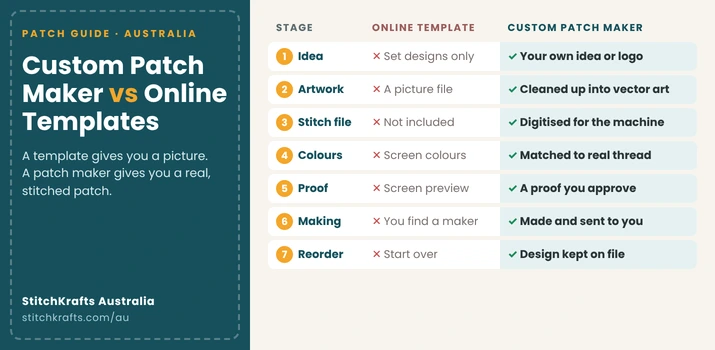
| Stage | Online Template | Custom Patch Maker |
| 1. The idea | You pick from set designs | You can use your own idea, sketch, or logo |
| 2. The artwork | You get a picture file | The artwork is cleaned up so it can be stitched |
| 3. The stitch file | Not included | Artwork is turned into stitch instructions |
| 4. The colours | Screen colours, which can look different in real thread | Matched to real thread colours |
| 5. The proof | A screen preview | A proof you check and approve |
| 6. The making | You must find someone to make it | Made for you |
| 7. Ordering again | You start over | Your design can be kept on file |
Now let’s look at each stage properly.
Stage 1: The Idea
With a template, you start from someone else’s design. That is quick, but it can look like everyone else’s. If a hundred people use the same template, a hundred patches look the same.
A custom patch maker starts from your idea. It can be a logo, a drawing, a photo, or even a rough sketch on paper. That makes your patch truly yours, which matters for a club crest, a business badge, or a team logo.
Stage 2: The Artwork
A picture on a screen is made of tiny dots. Zoom in, and the edges look blurry. A patch needs clean, sharp shapes with solid areas of colour.
A template gives you a picture. A patch maker turns your picture into clean artwork, called vector art, so the lines are sharp and every shape is clear. If your logo is only a blurry photo on a phone, this step fixes it. Our vector art service does exactly that.
Stage 3: The Stitch File
This is the stage that surprises people most.
An embroidery machine cannot read a picture. It needs a special file that tells it where to put every stitch, which direction to go, how close the stitches should be, and which colour to use. Making that file is called digitising.
A template does not include this. Even the best looking template is just a picture until someone digitises it. A patch maker, or a digitiser, does this work. Our embroidery digitising service turns artwork into a file the machine can sew.
A good stitch file is the difference between a sharp patch and a messy one. Poor stitching can make letters look fuzzy, or leave gaps where the fabric shows through.
Stage 4: The Colours
Screens glow, so colours look bright and clean on a phone. Thread does not glow. A bright blue on your screen can look darker, duller, or a different shade in real thread.
A patch maker uses a thread chart with real colours, and picks the closest match to your design. If you have brand colours, you can share the exact colour code and they will match it as closely as they can.
For Australian conditions, the type of thread matters too. Strong sun can fade some threads. Polyester thread keeps its colour better in the sun and the wash, so it is worth asking which one your patch maker uses.
Stage 5: The Proof
A proof is a picture of your finished patch, shown before it is made. It shows the size, the colours, the border, and the words. You check it, then say yes or ask for changes.
A template preview is just a screen mock up. It is not a promise of what the patch will look like. A proof from a patch maker shows what they will actually make. It is your chance to catch a spelling mistake before it is stitched, which costs nothing, instead of after, which costs a lot.
Stage 6: The Making
A template does not make anything. After you design on the screen, you still need to find a factory, send them the file, and hope it works.
A patch maker does the whole job. They set up the machines, stitch the patches, trim the edges, add the backing, and send them to you.
Our custom patches are made this way, from your idea through to the finished patch at your door.
Stage 7: Ordering Again
Clubs and schools order more than once. New players join. New students start. A badge wears out.
With a template, you often start from scratch. The colours might not match the first batch.
A patch maker can keep your design and colours on file. Then your next order matches the last one exactly, and you do not need to explain it all again.
Real Examples: Which One Fits?
Here are some real situations to make it easy.
- A footy club needs 60 crests for jackets. Use a patch maker. The crest has fine details, the colours must match the club’s, and the club will want to reorder next season.
- A café wants a staff logo for aprons. Use a patch maker. The logo needs to be cleaned up, and the patches need to survive hot washes.
- Someone wants one funny patch for a mate’s birthday. A stock patch or a template can work. It is a one off, so it does not need to last for years.
- A school wants a badge for a whole year group. Use a patch maker. The badge needs to match exactly, last through lots of washing, and be easy to reorder.
- You are not sure what you want yet. Use a template or a builder to play with ideas, then take your favourite to a patch maker to make it real.
Where Templates Are Actually Good
Templates are not bad. They are good at a few things. They are quick for trying ideas. They cost little or nothing. They are fine for very small, one off projects. And they help you work out what you like, before talking to a maker.
The best way to use them is as a sketchbook. Play with ideas, then ask a real patch maker to turn the best one into something stitchable.
Where Templates Fall Short
They give you a picture, not a patch. They do not include the stitch file. Screen colours may not match real thread. The same template can end up on many other patches. And there is often no proof, no help, and no one to ask if something looks wrong.
Five Questions to Ask Any Patch Supplier
Whether you use a template or a maker, ask these before you pay.
- Do I get a proof before you make it?
- Is digitising included, or is it an extra fee?
- Which thread do you use, and does it hold its colour in the sun?
- Is there a minimum order?
- Can you keep my design on file for next time?
If you want to compare makers in more detail, our guide to the best custom patch companies in Australia shows what to look for.
Common Mistakes to Avoid
Thinking a good looking picture is the same as a patch. Choosing colours only from a screen. Skipping the proof. Using a blurry photo as your artwork. Picking a template that other people also use, then wondering why it looks generic. And forgetting to ask whether digitising costs extra.
Frequently Asked Questions
Can I use a template to make a custom patch?
A template can help you plan the look, but it only gives you a picture. A patch maker still needs to turn it into a stitch file before it can be made.
What is digitising?
It is turning artwork into stitch instructions for an embroidery machine. It tells the machine where each stitch goes and what colour to use.
Is a custom patch maker more expensive than a template?
A template may cost less upfront, but a patch maker covers artwork, stitch files, proofs, and production, which a template does not.
Will my patch look like the screen preview?
Not always. Screen colours can differ from real thread, which is why a proof and a thread chart matter.
Do I need a perfect design to order from a patch maker?
No. A rough sketch or a blurry logo is often enough, since the maker can clean it up first.
Can I order the same patch again later?
Yes, if your patch maker keeps your design on file. It is smart to ask about this before your first order.
Ready to Make It Real?
If you have an idea, a sketch, or a template you love, bring it to us and we will help turn it into a real patch. StitchKrafts Australia works with clubs, schools, and small businesses in Melbourne, Sydney, and all across the country. Tell us what you are making, and we will talk you through the options before you order.